How to Use the Eisenhower Matrix With Time Blocking
Use the Eisenhower Matrix to prioritize tasks by urgency and importance, then turn important work into real calendar blocks with time blocking.
You have a list of things to do.
Some need attention today. Some matter, but nobody is asking for them yet. Some feel urgent simply because a notification appeared. Others probably do not need to be done at all.
The Eisenhower Matrix helps with the first decision:
What deserves my attention?
Time blocking helps with the next one:
When am I actually going to do it?
Used together, the workflow becomes:
Capture tasks → prioritize them → schedule important work → do the work
The matrix decides what matters. Your calendar gives that work a place to happen.
What is the Eisenhower Matrix?
The Eisenhower Matrix is a simple way to prioritize tasks using two questions:
- Is this important?
- Is this urgent?
Those two decisions create four quadrants:
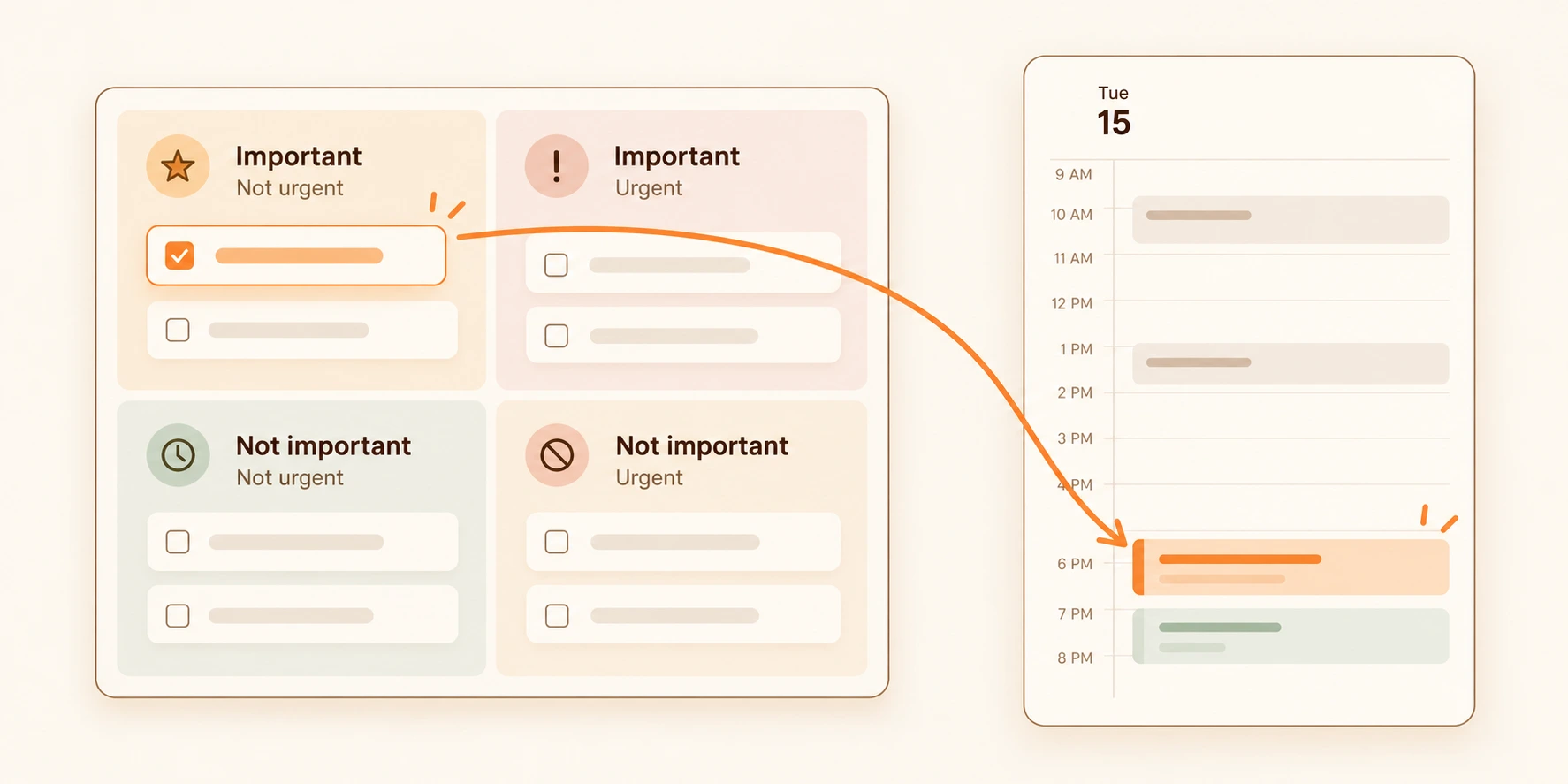
- Important + Urgent → Do
- Important + Not urgent → Schedule
- Not important + Urgent → Delegate
- Not important + Not urgent → Eliminate
You may also see it called the Urgent–Important Matrix, Priority Matrix, or 4-Quadrant Priority Matrix.
Instead of treating every item on your to-do list equally, you decide what kind of attention each task deserves.
The four quadrants
1. Important and urgent: Do
These tasks matter and need attention soon.
For example:
- Fix a production bug affecting customers
- Submit an application due today
- Prepare for an exam tomorrow
- Pay a bill before the deadline
They belong in Do.
That does not always mean dropping everything immediately. If a task needs 45 minutes this afternoon, you can still give it a specific time block. The important point is that it should not quietly remain on your list while the deadline gets closer.
2. Important and not urgent: Schedule
These tasks matter, but there is no immediate pressure forcing you to begin.
For example:
- Exercise
- Learn a new skill
- Work on a side project
- Improve your portfolio
- Spend time on a personal goal
This is often the easiest quadrant to neglect. Urgent work creates its own reminders: deadlines get closer, customers follow up, and problems become visible. Important but non-urgent work usually stays quiet.
The traditional instruction for this quadrant is:
Schedule it.
But that creates another question.
3. Not important and urgent: Delegate
These tasks feel time-sensitive but do not contribute much to your most important outcomes.
If possible, delegate, automate, simplify, or batch them. Not everyone has someone to delegate to; the useful idea is to avoid letting low-importance urgency consume your best time.
4. Not important and not urgent: Eliminate
These tasks neither matter much nor need attention soon.
Remove them, postpone them, or intentionally leave them unscheduled. Prioritization is partly about deciding what will not receive your time.
What does “Schedule” actually mean?
Imagine that you place this task in the Important + Not Urgent quadrant:
Exercise for 30 minutes
You have correctly prioritized it.
But tomorrow it is still sitting there. Then the next day. Then next week.
The task has been categorized as Schedule, but it has not actually been scheduled.
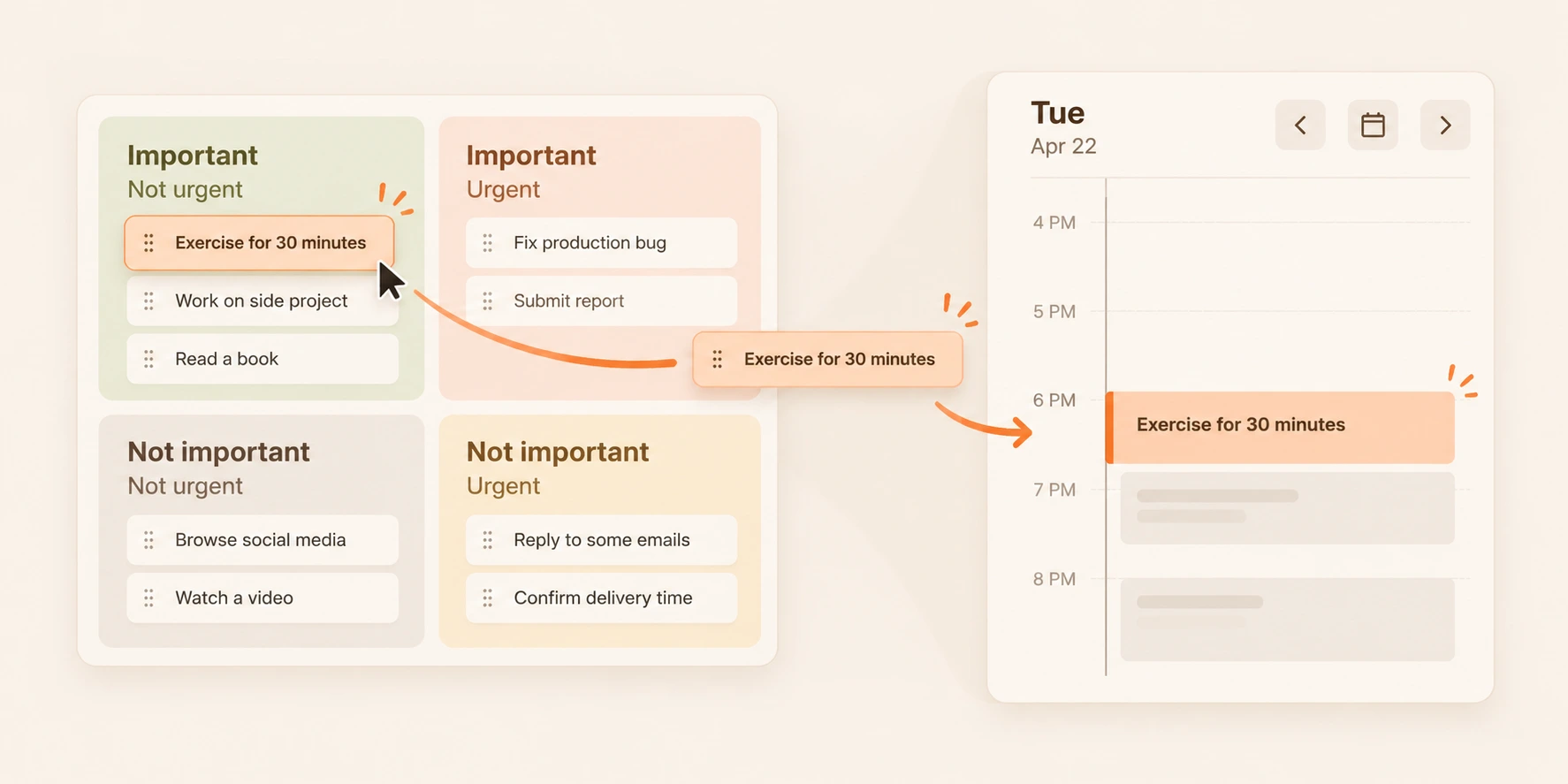
Putting a task in the Schedule quadrant is a decision about priority.
Putting it on your calendar is a decision about time.
You can turn:
Exercise for 30 minutes
into:
Wednesday · 6:00–6:30 PM — Exercise
Now the task has somewhere to happen.
That is where time blocking fits naturally with the Eisenhower Matrix.
What is time blocking?
Time blocking means giving a task or activity a specific period on your calendar.
Instead of keeping:
Write article
on a to-do list, you might plan:
10:00–11:00 AM — Write article introduction
The task answers:
What should I do?
The time block answers:
When will I do it?
This does not mean every minute of your day needs to be planned. A time block is simply a commitment to make room for something that matters.
Eisenhower Matrix vs. time blocking
The Eisenhower Matrix and time blocking solve different problems.
The Eisenhower Matrix helps when you have too many possible things to do. Time blocking helps when you know what matters but still need to make space for it.
You can think of them like this:
Eisenhower Matrix → What deserves my time?
Time blocking → When will I give it that time?
If you use time blocking without prioritizing, you can create a beautifully organized calendar full of low-value work.
If you use the Eisenhower Matrix without scheduling, important tasks can remain correctly categorized but untouched.
Together, they create a more complete path from decision to action.
How to combine the Eisenhower Matrix with time blocking
You do not need to rebuild your entire productivity system. Start with the tasks already competing for your attention.
1. Capture the tasks you are thinking about
Write them down before trying to organize them.
For example:
- Fix checkout bug
- Exercise
- Reply to client
- Confirm delivery time
- Work on portfolio
- Browse new website themes
- Read documentation
At this point, do not worry about the order. The goal is simply to get the competing tasks into one place.
2. Decide what is important
Ask:
Does completing this meaningfully affect something I care about?
Importance usually comes from consequences, responsibilities, goals, or values.
For example, Work on portfolio may be important because you are looking for a new job. Browse new website themes may be interesting without meaningfully moving anything forward.
Importance is not the same as difficulty. A five-minute task can be important, while a three-hour task can be unimportant.
3. Decide what is urgent
Ask:
Does this need attention soon?
Urgency usually comes from time: a deadline is approaching, someone is waiting, a problem is happening now, or an opportunity will disappear.
Be careful with notifications, messages, and interruptions. Something can demand your attention without actually deserving priority.
4. Place each task in a quadrant
For example:
Important + Urgent
Fix checkout bug
Important + Not Urgent
Exercise
Work on portfolio
Read documentation
Not Important + Urgent
Confirm delivery time
Not Important + Not Urgent
Browse new website themes
At this point, the matrix has done its job: you have made the priority decision.
5. Give important work a real time
Look first at the tasks in Important + Urgent and Important + Not Urgent.
Ask:
When can I realistically do this?
For example:
9:00–10:00 AM — Fix checkout bug
6:00–6:30 PM — Exercise
Saturday · 10:00–11:30 AM — Work on portfolio
Now those tasks are no longer just priorities. They are commitments with a place in time.
From four quadrants to today's calendar
You can use the Eisenhower Matrix and time blocking with paper, sticky notes, a spreadsheet, or separate apps.
But moving between separate systems can create a small gap:
This is important.
Then:
I should schedule this.
Then you open another tool and recreate the task on your calendar.
BreakToGoal is designed to keep those steps closer together. You can bring Goal tasks, routines, and everyday todos into the same priority view, compare importance and urgency, and then give the work you choose a place on your calendar.
The workflow becomes:
Task → Priority → Calendar → Execution
Suppose one of your goals is:
Build a healthier body
and one of the tasks connected to it is:
Complete a core workout
You decide the workout is Important + Not Urgent, then give it a time:
Tuesday · 6:00–6:30 PM
When Tuesday evening arrives, you no longer need to make the priority decision again. Your calendar can simply tell you what you chose to do.
Use goals to decide what is important
Sometimes the hardest part of the Eisenhower Matrix is not deciding what is urgent. Urgency is often visible.
The harder question is:
What is important?
A task becomes easier to evaluate when you know what it serves.
For example:
Practice interview answers
may look optional in isolation. But if your goal is:
Get a remote software engineering job
the relationship becomes much clearer.
The goal gives the task context. This is one reason BreakToGoal keeps tasks connected to larger Goals.
A simple execution chain can look like:
Goal: Get a remote developer job
↓
Task: Practice technical interview answers
↓
Priority: Important + Not Urgent
↓
Calendar: Thursday · 7:00–7:45 PM
↓
Execution: Complete the practice session
The goal explains why the task matters. The matrix helps decide when it deserves attention relative to other work. The calendar gives it a place to happen. Completing the task turns the plan into progress.
Keep the matrix focused on decisions
The Eisenhower Matrix should help you make a decision, not become another collection that needs constant maintenance.
If a task is obviously important and urgent, you do not need to debate its exact position for ten minutes. If something clearly does not matter, you do not need to carefully arrange it in Q4.
The useful outcome is clarity about what deserves your time next.
Pick one important task you have been postponing. Decide whether it is urgent. If it belongs in Important + Not Urgent, do not stop after placing it in the Schedule quadrant — give it a realistic time on your calendar.
That completes the loop:
Decide what matters → give it time → do the work
The Eisenhower Matrix helps you choose. Time blocking helps that choice survive contact with the rest of your day.
Frequently Asked Questions
What is the difference between the Eisenhower Matrix and time blocking?
The Eisenhower Matrix is a prioritization method. It helps you decide which tasks are important and urgent. Time blocking is a scheduling method. It gives chosen tasks specific periods on your calendar. The matrix answers what deserves your attention, while time blocking answers when you will give it that attention.
Which Eisenhower Matrix quadrant should I schedule?
Important + Not Urgent is traditionally the Schedule quadrant, so it is the clearest place to use time blocking. Important + Urgent tasks can also be scheduled when they need to happen later in the day rather than immediately.
What is the difference between important and urgent?
Important tasks meaningfully affect your goals, responsibilities, or outcomes. Urgent tasks require attention soon because of a deadline, consequence, request, or changing situation. A task can be important without being urgent, urgent without being important, both, or neither.
Do I need to delegate every Not Important + Urgent task?
No. Delegation is not possible for everyone. If you cannot delegate a task, you can still simplify it, automate it, batch it with similar work, handle it quickly, or deliberately limit how much time it receives.
Can I use the Eisenhower Matrix in BreakToGoal?
Yes. BreakToGoal lets you compare tasks by importance and urgency using an Eisenhower Matrix, then give the work you choose a place on your calendar. Tasks can also remain connected to larger Goals so you can see why the work matters and let completed actions contribute to progress.
Share this post
About the Author
BreakToGoal Team
Passionate about productivity, time management, and helping people achieve their goals through innovative approaches.