October 2025: Calendar Target Link Glow-Up
Calendar events now reflect their target impact with live scheduled and completed badges, so every drag-and-drop task shows its momentum in the sidebar.
What Changed
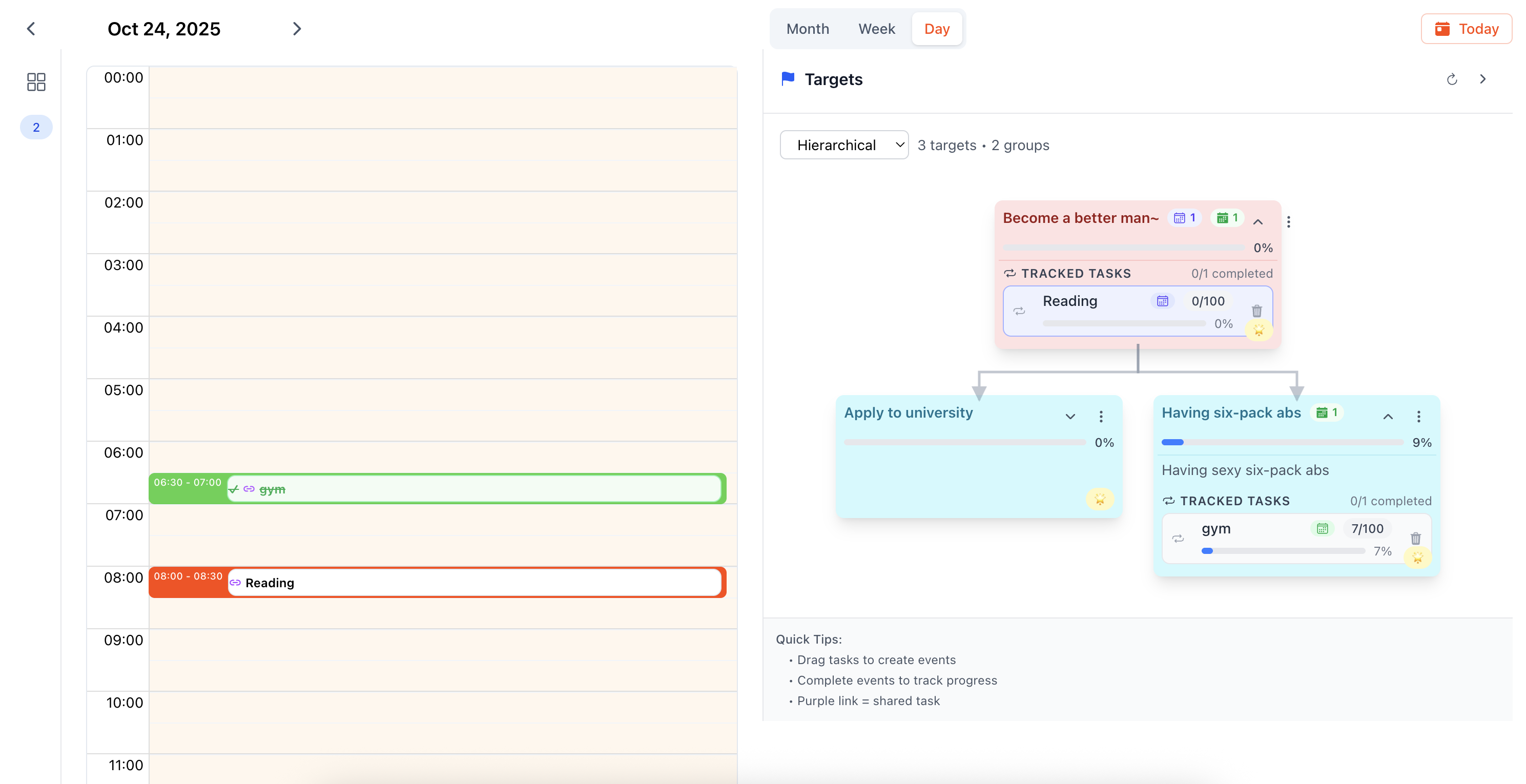
Dual Badges for Linked Target Progress
Targets now show two calendar icons beside their title: a blue badge for tasks you have scheduled and a green badge for the ones you’ve completed. Because the counts include every child node, you can glance at a parent target and instantly see how its tree is filling up—no extra clicks required.
Task Rows Mirror Calendar State
Tracked tasks inside each target card echo the same feedback. When you drag a task into the calendar and mark the event done, the row flashes a spinner while it syncs, then locks in the updated status. You can finally feel how calendar events and target victories move in the same rhythm.
How to Use It
- Drag and Drop: Pull a task from the target sidebar into your calendar. The blue badge increments as soon as the event lands in your schedule.
- Complete the Win: Finish the event and mark it done—the badge turns the count green, letting you celebrate the small victory and see progress ripple through the target tree.
- Scan Your Tree: Use the sidebar on busy days to gauge which goals already have momentum and where one more scheduled block will matter most.
Why It Matters
Linking calendar events to targets has always been powerful, but now it’s visible in the moment. The twin badges confirm that every micro action—each drag, each checkmark—feeds the larger mission. Small wins stack into big ones, and your sidebar now narrates that story in real time.
For Power Users
- Counts are recursive across child targets, so rolling summaries stay accurate even in deep hierarchies.
- The badges respect shared tasks, avoiding duplicate tallies when a single task fuels multiple branches.
- Spinners appear only while a linked event is saving, keeping the UI calm yet responsive.
Up Next
We’re exploring timeline overlays that surface these same counts across the day view, so you can forecast which goals will get love tomorrow before the sun even rises.